Open Telemetry to catch bottlenecks
Dots pattern

Observability for Ruby on Rails: Getting Started with OpenTelemetry

When building an application, it’s natural to focus on features and requirements. But once the app reaches real users, the feedback often shifts to performance: "This is too slow!" What worked seamlessly on your development machine can behave very differently in production.

That’s where OpenTelemetry comes in. By capturing critical insights throughout development, testing, and live environments, it gives you the visibility needed to pinpoint bottlenecks and fine-tune performance. The result? Applications that not only deliver the right features but also meet user expectations for speed and reliability.

At Digitize, we view telemetry as a cornerstone of building great software. It’s what allows us to ship Rails applications that are both feature-rich and consistently smooth for every user.

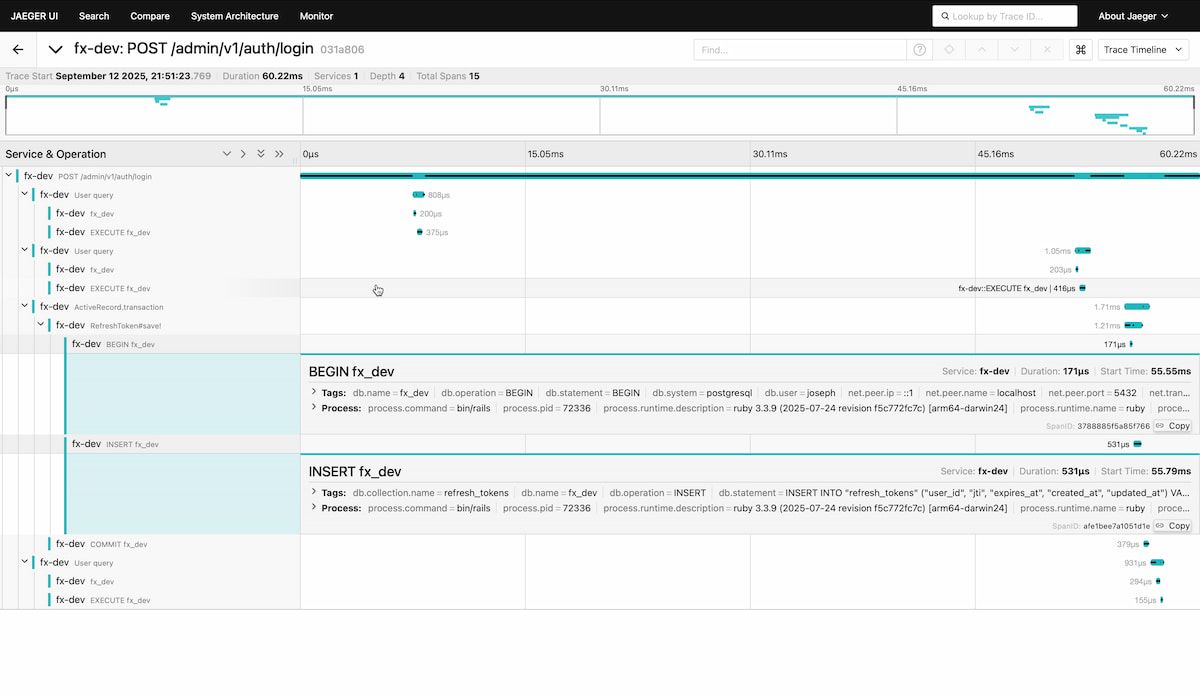
This guide will be a quick one to show you how you can quickly get a Dashboard like the following that shows you important information.

Open telemetry trace in Ruby on Rails

Install required plugins

bundle add opentelemetry-sdk opentelemetry-instrumentation-all opentelemetry-instrumentation-all
bundle install

Create an initializer

# config/initializers/opentelemetry.rb
require 'opentelemetry/sdk'
require 'opentelemetry/instrumentation/all'
require 'opentelemetry-exporter-otlp'
OpenTelemetry::SDK.configure do |c|
  c.service_name = ENV['TELEMETRY_NAME']
  c.use_all()
end

We set the service name using environment variables so we can have different names per environment.

Launch Jaeger

There are many different platforms for viewing telemetry data, but Jaeger is one of the easiest to set up and run locally. It provides a clear interface for visualizing traces, making it a great starting point when you’re first exploring OpenTelemetry. Jaeger Github

docker run --rm --name jaeger \
  -p 4318:4318 \
  -p 16686:16686 \
  jaegertracing/all-in-one:latest

4318 is the HTTP port 16686 is the web UI You can access on http://localhost:16686

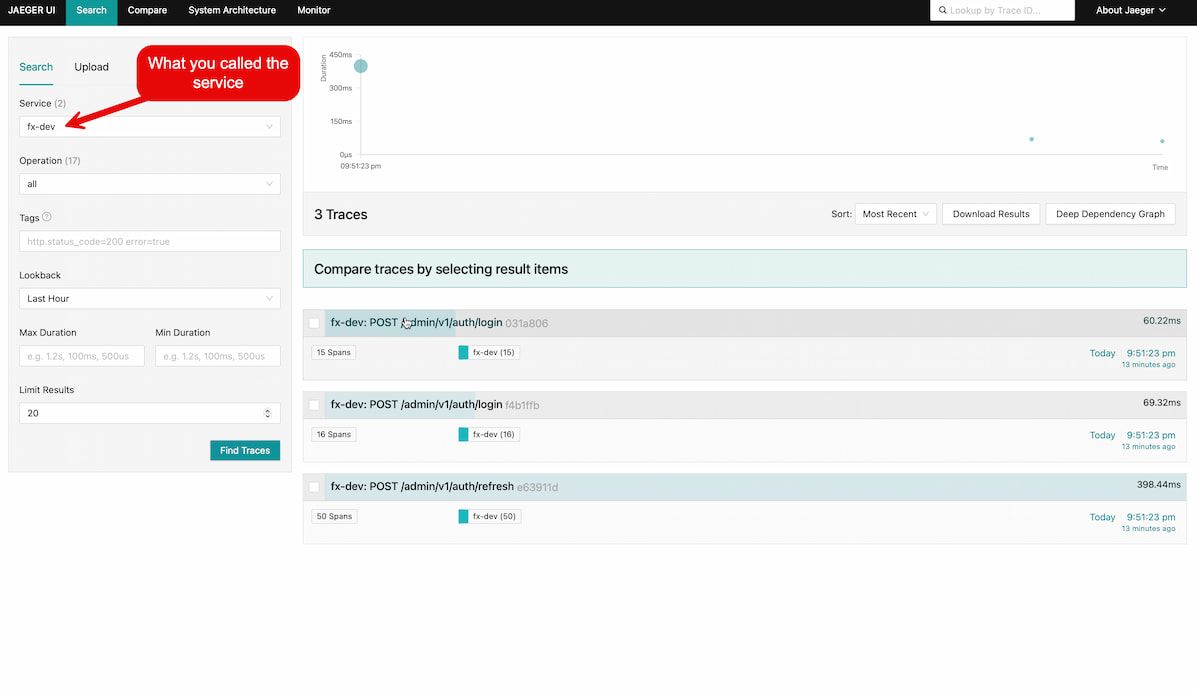
This will give you a web UI like the following

Jaeger web UI dashboard

That's it!

With OpenTelemetry installed in your Rails application, you’re ready to see it in action. Start your app, visit a page to generate some traffic, and then open http://localhost:16686 in your browser. From there, select your service and explore the traces — you’ll be able to follow requests end-to-end and uncover what’s really happening under the hood.

Related articles

Essential Software for Thriving Businesses: CRM, Manpower, and Inventory Management Systems

Equip your business with essential software to thrive in today's digital landscape. From productivity tools to data analytics, these software solutions drive efficiency, foster innovation, and fuel growth. Discover the must-have software for your business success in our comprehensive guide.

Read More

The importance of updating and maintaining Ruby on Rails applications

Boost your Ruby on Rails application's performance, security, and efficiency with our gem upgrades. Experience seamless integration, improved functionality, and the latest features that keep your app ahead of the curve. Upgrade your gems today and unlock the full potential of your Rails application!

Read More

Collaboration With Ruby On Rails Developers: Establishing A Seamless Partnership For Web Projects

Establish a seamless partnership with our expert Ruby on Rails developers. We prioritize collaboration, transparency, and mutual growth, ensuring your project's success. Leverage our technical expertise and industry experience to build high-quality, efficient, and scalable web applications. Join us for a collaborative and rewarding development journey

Read More
Get In Touch

Why partner with Digitize?

At Digitize, we are a focused team that invest constantly in improving so that we can provide the best capabilities to our clients. Our processes and teams are built around being flexible so we can deliver tailored solutions instead of trying to make existing solutions fit.

Each client has a dedicated account manager that will ensure you are always getting the best service possible.